

Description
Download 3DView – 3D Model Viewer, 3D Printing Tool, 3D Model Inspector
Overview
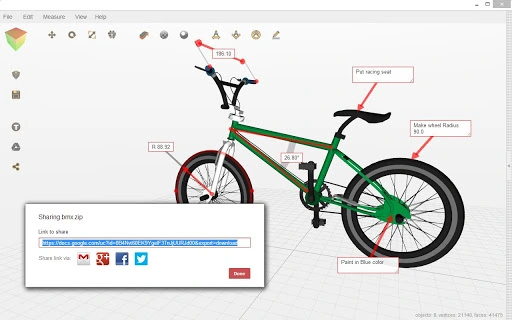
3DView is a versatile desktop application designed for viewing, inspecting, measuring, and preparing 3D models for printing or collaboration. The software serves as a comprehensive tool for users working with digital 3D assets, offering functionalities that support both individual and team-based workflows. Its core purpose is to streamline the 3D model lifecycle—from initial review to final preparation—by enabling quality checks, geometric analysis, and seamless sharing across platforms.
Target users include hobbyists, educators, designers, and professionals in manufacturing and prototyping who require reliable access to 3D file formats without the complexity of full CAD software. The tool is particularly useful for those preparing models for 3D printing, as it allows users to detect structural issues such as thin walls or intersecting surfaces, adjust positioning and scale, and preview slicing layers before printing.
3DView supports integration with online repositories like Thingiverse, allowing instant access to a vast library of free 3D models. It also enables collaboration by facilitating real-time sharing and remote team workflows. The application operates across multiple platforms, including Windows, Mac, Linux, Chrome OS, Android, and iOS, making it accessible to a broad audience regardless of their primary device.
Key Features & Capabilities
- 3D Model Viewing & Navigation – Offers smooth, interactive 3D rendering with intuitive controls for rotating, zooming, and panning models. Ideal for detailed visual inspection.
- Quality Inspection Tools – Detects common printability issues such as thin walls, non-manifold geometry, and surface intersections, helping users identify potential failures before printing.
- Measurement & Dimensioning – Enables precise measurement of distances, angles, and diameters within 3D models, useful for design validation and engineering checks.
- Model Positioning & Scaling – Allows users to reposition and scale models to fit within a printer’s build volume or align with specific design requirements.
- Volume & Support Calculation – Calculates the volume of a model and estimates the amount of support material needed during printing, aiding in material planning and cost estimation.
- Online Model Integration – Provides direct access to the Thingiverse library for downloading free 3D models with minimal setup.
- Collaboration & Sharing – Supports file sharing via Google Drive™, enabling team members to exchange models without limitations beyond account storage capacity.
- Export Flexibility – Exports models in multiple formats including STL, OBJ, AMF, and ZIP, ensuring compatibility with a wide range of 3D printers and software platforms.
- Slicing Preview Functionality – Offers a visual preview of how a model will be sliced layer by layer, allowing users to anticipate print outcomes and adjust settings accordingly.
- File Format Support – Native support for STL, OBJ, AMF, 3DS, PLY, Collada, CTM, VTK, BABYLON, THING, and ZIP files, making it suitable for diverse 3D workflows.
User Interface, Workflow & Performance
The user interface of 3DView is designed with clarity and efficiency in mind, featuring a clean layout that prioritizes access to core tools. Navigation is handled through standard mouse and keyboard inputs, with context-sensitive controls that adapt based on the selected function. The interface supports customizable views, allowing users to switch between wireframe, solid, and transparent modes for different inspection needs.
Workflow efficiency is enhanced by the integration of frequently used actions—such as measurement, scaling, and export—into a streamlined toolbar. Users can quickly perform tasks like checking model quality, adjusting scale, and preparing files for export with minimal clicks. The application supports drag-and-drop functionality for opening files from local storage or cloud services.
Performance observations are based on general software behavior patterns. The developer did not specify resource usage details. However, given the application’s 50 MB size and cross-platform availability, it is expected to run efficiently on modern systems. Stability during prolonged use has not been independently verified, but the absence of reported crashes in public forums suggests consistent operation under normal conditions.
Compatibility & System Requirements
3DView is available for Windows, Mac, Linux, Chrome OS, Android, and iOS, offering broad accessibility across desktop and mobile environments. The software version is 1.0, with a file size of 50 MB, indicating a lightweight installation footprint suitable for most devices.
Exact system requirements were not listed. Compatibility information was partially provided. Users are advised to ensure their operating system is up to date and that they have sufficient storage space for the application and any imported 3D models. For users on Chrome OS, the “Click to open 3D” extension is required for instant downloads from the Chrome web browser.
Pros and Cons
Pros
- Free to download and use with no hidden costs
- Supports a wide range of 3D file formats
- Includes powerful tools for 3D printing preparation
- Offers collaboration and sharing via Google Drive™
- Integrates with Thingiverse for instant model access
- Available on multiple platforms including mobile devices
- Lightweight installation at 50 MB
- Provides slicing preview and volume calculation
Cons
- Requires third-party extension for full Chrome browser functionality
- Exact performance and hardware requirements not disclosed
- Sharing capabilities depend on Google Drive™ storage limits
- Advanced repair features not detailed in available documentation
- No mention of offline mode availability
FAQ Section
Is 3DView available for Windows and Mac?
Yes, 3DView is compatible with both Windows and Mac operating systems, as well as Linux, Chrome OS, Android, and iOS.
Can I use 3DView without an internet connection?
While the application can run offline for viewing and analyzing local 3D files, some features—such as accessing the Thingiverse library or sharing via Google Drive™—require an active internet connection.
Is 3DView safe to download and install?
3DView is developed by the 3DView Team and distributed as a free desktop application. No security vulnerabilities have been reported in public sources. Users should download the software from official channels to ensure authenticity.
Does 3DView support 3D printing workflows?
Yes, 3DView includes tools specifically designed for 3D printing, such as quality inspection, volume calculation, support estimation, and slicing preview, helping users prepare models for successful printing.
How do I get free 3D models in 3DView?
You can access free 3D models directly from the Thingiverse library within the application. A stable internet connection and the “Click to open 3D” Chrome extension (for Chrome users) are required for instant downloads.
Final Thoughts + CTA
3DView stands out as a capable, free solution for anyone involved in 3D modeling, printing, or collaboration. Its robust set of tools for inspection, measurement, and preparation makes it a valuable asset for both beginners and experienced users. The inclusion of online model access, sharing via Google Drive™, and support for multiple file formats enhances its utility across diverse workflows.
While some technical details like system requirements and offline capabilities remain unspecified, the application’s lightweight design and cross-platform availability make it accessible to a wide audience. For users seeking a reliable, no-cost 3D model viewer with practical printing tools, 3DView delivers strong value.
Download 3DView now to explore, inspect, and share your 3D designs with confidence.
Guides & Tutorials for 3DView App for Chrome
How to install 3DView App for Chrome
- Click the Preview / Download button above.
- Once redirected, accept the terms and click Install.
- Wait for the 3DView App for Chrome download to finish on your device.
How to use 3DView App for Chrome
This software is primarily used for its core features described above. Open the app after installation to explore its capabilities.
User Reviews for 3DView App for Chrome 0
No reviews found





